Code signing

Ensure software authenticity and protect against malware risks with a secure, trusted solution aligned with EU standards.

Need an Organisation Validation Code Signing certificate?
Add to cart

Increase client trust and security with Actalis Code Signing

Actalis Code Signing certificates allow you to digitally sign a wide range of applications, scripts and executables, ensuring authenticity, integrity and protection against tampering.

Rely on an EU-recognised solution backed by strong identity verification and secure remote private-key management.

Actalis is a Qualified Trust Service Provider (QTSP) under eIDAS. Learn more about the benefits

Organization Validated For organisational identity verification
Validity: 1 year
€180.00 + VAT
OV Code Signing certificates include verification of the following:
  • VAT or Company Registration Number
  • Country in which the requesting organisation is registered or incorporated
  • Verified organisation telephone number
  • Order authorisation

Prepare for changes in SSL validity 

The CA/Browser Forum’s decision is now in place. Choose the right solution with Actalis.

Act now.

How Code Signing works in a few simple steps

Request the certificate

Receive remote signing credentials

Must be changed at first access

Download ActalisCodeSigner

Sign your files

Add timestamp

How it works

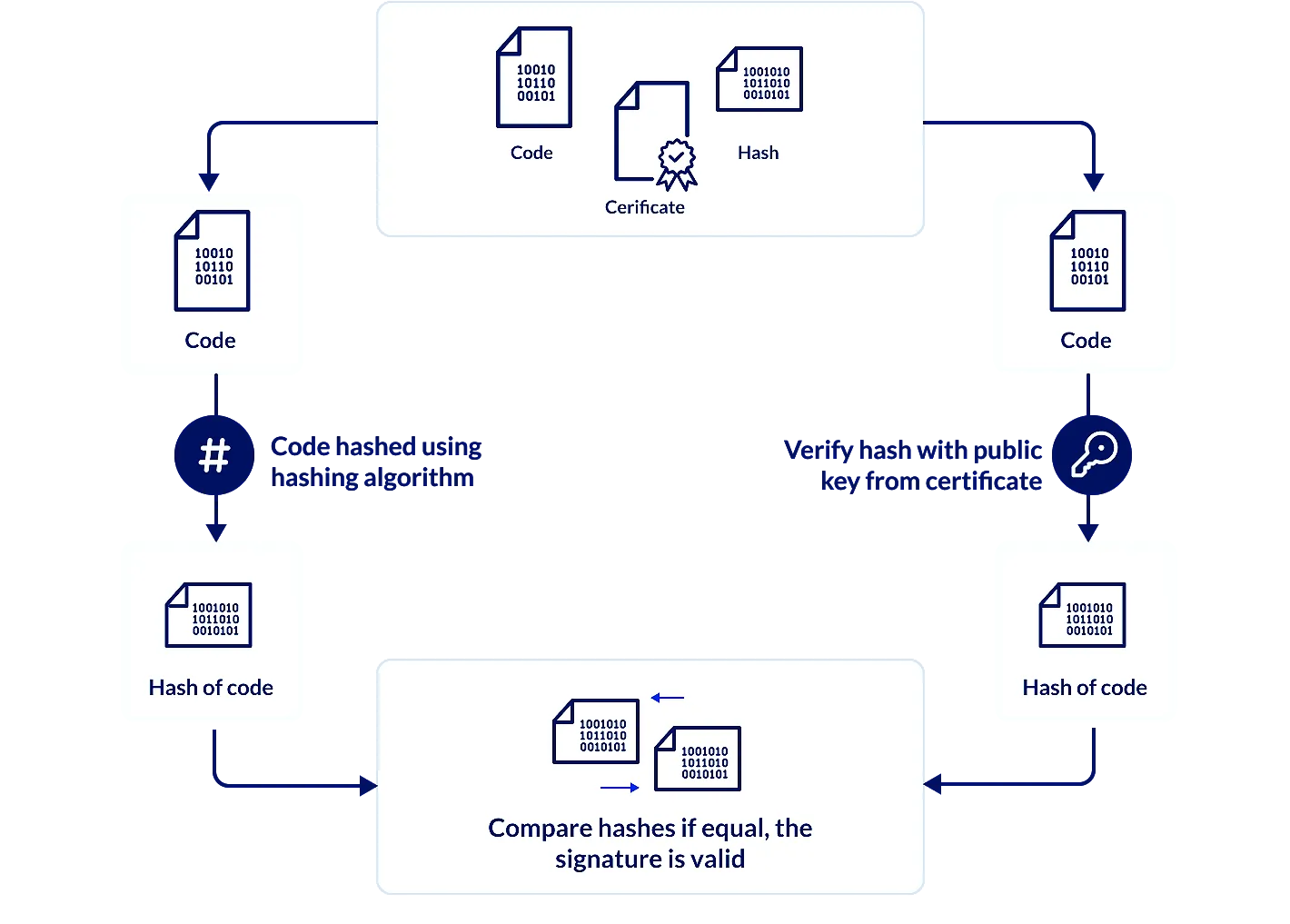
Code Signing uses public key cryptography and cryptographic hashing to ensure the authenticity and integrity of software. If the signature cannot be validated, the user is shown a security warning or error.

Who needs Code Signing

Who needs Code Signing

Software house

To ensure applications have not been tampered with.

System integrator

To demonstrate that software originates from a verified publisher and can be trusted.

Vendor Enterprise

To secure data exchange with enterprise systems and protect the integrity of corporate software.

IT Department

To safeguard proprietary components and ensure the integrity of software distributed to clients and partners.

Developers

To maintain authenticity and integrity throughout the software lifecycle.

IT Department

To safeguard proprietary components and ensure the integrity of software distributed to clients and partners.

Developers

To maintain authenticity and integrity throughout the software lifecycle.

IT Department

To safeguard proprietary components and ensure the integrity of software distributed to clients and partners.

Developers

To maintain authenticity and integrity throughout the software lifecycle.

Where Code Signing is compulsory

Where Code Signing is compulsory

Medical field

Sensitive data protection.

Device software updates must be digitally signed to prevent tampering and ensure traceability.

Supplier authentication.

Suppliers must sign their software to demonstrate that it originates from an authorised and unaltered source.

Automotive industry

Software integrity and authenticity.

Software installed on vehicles and embedded systems must be digitally signed to prevent malware injection during updates.

Safe OTA (Over The Air) updates.

Developers need to implement Code Signing mechanisms to ensure that OTA updates are authentic and have not been compromised.

Financial sector

Application security.

Digital signatures are required to ensure that financial and transactional software has not been altered by third parties.

API authentication.

Code Signing helps guarantee the integrity of APIs used in financial services and client applications.

Software industry

Protection against malware.

Code Signing prevents malicious or unauthorised code from being executed.

Developer authentication.

Digitally signed software confirms that code originates from a verified developer or organisation.

Public Sector

Security compliance.

Public sector software must be digitally signed to prevent tampering and unauthorised use.

Critical infrastructure protection.

Software used in critical governmental and national infrastructure must be signed to reduce cyber-security risks.

Medical field

Sensitive data protection.

Device software updates must be digitally signed to prevent tampering and ensure traceability.

Supplier authentication.

Suppliers must sign their software to demonstrate that it originates from an authorised and unaltered source.

Medical field

Sensitive data protection.

Device software updates must be digitally signed to prevent tampering and ensure traceability.

Supplier authentication.

Suppliers must sign their software to demonstrate that it originates from an authorised and unaltered source.

Automotive industry

Software integrity and authenticity.

Software installed on vehicles and embedded systems must be digitally signed to prevent malware injection during updates.

Safe OTA (Over The Air) updates.

Developers need to implement Code Signing mechanisms to ensure that OTA updates are authentic and have not been compromised.

Financial sector

Application security.

Digital signatures are required to ensure that financial and transactional software has not been altered by third parties.

API authentication.

Code Signing helps guarantee the integrity of APIs used in financial services and client applications.

Software industry

Protection against malware.

Code Signing prevents malicious or unauthorised code from being executed.

Developer authentication.

Digitally signed software confirms that code originates from a verified developer or organisation.

Public Sector

Security compliance.

Public sector software must be digitally signed to prevent tampering and unauthorised use.

Critical infrastructure protection.

Software used in critical governmental and national infrastructure must be signed to reduce cyber-security risks.

Medical field

Sensitive data protection.

Device software updates must be digitally signed to prevent tampering and ensure traceability.

Supplier authentication.

Suppliers must sign their software to demonstrate that it originates from an authorised and unaltered source.

Medical field

Sensitive data protection.

Device software updates must be digitally signed to prevent tampering and ensure traceability.

Supplier authentication.

Suppliers must sign their software to demonstrate that it originates from an authorised and unaltered source.

Automotive industry

Software integrity and authenticity.

Software installed on vehicles and embedded systems must be digitally signed to prevent malware injection during updates.

Safe OTA (Over The Air) updates.

Developers need to implement Code Signing mechanisms to ensure that OTA updates are authentic and have not been compromised.

Financial sector

Application security.

Digital signatures are required to ensure that financial and transactional software has not been altered by third parties.

API authentication.

Code Signing helps guarantee the integrity of APIs used in financial services and client applications.

Software industry

Protection against malware.

Code Signing prevents malicious or unauthorised code from being executed.

Developer authentication.

Digitally signed software confirms that code originates from a verified developer or organisation.

Public Sector

Security compliance.

Public sector software must be digitally signed to prevent tampering and unauthorised use.

Critical infrastructure protection.

Software used in critical governmental and national infrastructure must be signed to reduce cyber-security risks.

Medical field

Sensitive data protection.

Device software updates must be digitally signed to prevent tampering and ensure traceability.

Supplier authentication.

Suppliers must sign their software to demonstrate that it originates from an authorised and unaltered source.

Code Signing Tools

Get the most out of your Code Signing.

Actalis Code Signer

The Actalis Code Signer client enables fast and secure Code Signing. Digitally sign applications and software packages with cryptographic assurance of publisher identity and code integrity, ensuring that signed code has not been altered after publication.

Download client documentation

Time stamping

The service applies a trusted timestamp to the digital signature associated with executable code. This proves that the signed data existed at a specific point in time and has not been modified since.

Timestamping allows operating systems to continue trusting signed software even after the code signing certificate has expired, preserving long-term validity.
Boost your users' confidence with our Code Signing certificates.

Actalis's timestamping service address is: http://timestamp.actalis.com

This endpoint is not a browseable website, but a timestamping server implementing the RFC 3161 protocol, designed for integration with Code Signing clients.

Why choose Actalis for Code Signing

With millions of users, we're a leading Certification Authority in Europe

After more than twenty years operating as a Certification Authority, we have served tens of millions of clients with certified trust services, ranking among Europe’s leading CAs according to Netcraft data.

eIDAS-compliant EU security and members of the CAB Forum
Your identity verification follows EU standards, ensuring regulatory compliance and a high level of trust.

Timestamping included
The signature remains valid even after certificate expiry.

Token-free, secure remote signatures
The private key is securely stored by Actalis, eliminating local compromise risks and removing the need for on-premises hardware.

Competitive pricing with Italian support
European CA quality at a lower cost compared to global competitors.

Executable, package and script support
Use from the command line: extract the application archive to a system folder and run the signing commands. Refer to the manual for detailed instructions.

HSM-generated keys
Actalis generates Code Signing keys on HSM (Hardware Security Module), dedicated cryptographic devices designed to protect the entire key lifecycle.

Actalis solutions for Code Signing certificates

Code Signing certificates, like all our other products, comply with CAB Forum requirements, the industry body that brings together the world’s leading Certification Authorities.

Centralised certificate management with Actalis CertiManager

Code Signing as a Service

The Actalis CertiManager web application allows organisations to autonomously issue and manage Code Signing certificates. It provides full lifecycle control, including monitoring, renewal and revocation of issued certificates.

Actalis generates Code Signing keys on HSMs hosted in its own secure data centers, where the relevant certificates are installed and managed. The issuing process is fully cloud-based and automated, requiring no client-side CSR generation or certificate installation on local systems.

FAQs

What happens when a Code Signing certificate expires?

Software signed with a valid trusted timestamp remains valid after the certificate expires. Without timestamping, signatures will stop being recognised once the certificate expires.

What has changed for EV Code Signing certificates since February 2024?

Since February 2024, Microsoft no longer provides additional trust or recognition for EV Code Signing certificates.

In parallel, the CCADB (Common CA Database) no longer accepts compliance reviews (audits) specifically related to EV Code Signing.


As a result, EV and standard Code Signing certificates now offer the same level of trust within the Microsoft ecosystem.

Can I purchase Code Signing by providing a mobile phone number instead of a landline number?

Yes. You can provide a mobile phone number during the purchase and validation process.

How often does my certificate password expire?

The Code Signing password does not have its own expiry date. It remains valid until the associated certificate expires.

Does the Code Signing certificate support manifest signing?

At present, Actalis Code Signing does not support the signing of manifest files generated by Visual Studio or other IDEs. If your application requires manifest signing, you can instead integrate a .p12 or similar keystore directly into the IDE at the final stage of the build process.

Is it mandatory to store private keys in hardware cryptographic devices?

Yes. For qualified trust services, private keys must be generated and stored in certified hardware cryptographic devices.

If I use Actalis Code Signer, will my signature be compliant with the Windows SignTool?

Yes. Signatures generated with Actalis Code Signer are fully compatible with Microsoft SignTool. Read the guide to download and use Actalis Code Signer.

Where can I find best practices for Code Signing certificates?

Code Signing best practices are available in the dedicated documentation section of our website

Does Actalis Code Signer allow you to sign manifest files?

No. Actalis Code Signer does not currently support signing manifest files generated by Visual Studio or other IDEs.

Why do I need to change my password before signing?

For security reasons, the remote Code Signing account is created with an initial, expired password.

When you log in for the first time, you will be prompted to set a new password. Simply follow the on-screen wizard to complete the change. Until the password is updated, the account cannot be used for signing operations. 

Can the Code Signing certificate include a specific company Business Unit?

Yes, a specific Business Unit can be included in the Code Signing certificate. The Business Unit can be specified in the remote user fields during the configuration process.

However, Business Units are not supported in the standard provisioning flow for Code Signing certificates.

I received an email with the message “SSL certificate issued”, but I did not order an SSL certificate. What does this mean?

This message can be received during the activation process of a Code Signing certificate. Please verify that the certificate issued in your account is a Code Signing certificate.

If you are unsure or need confirmation, we recommend, opening a support ticket so our team can assist you.

What happens if the Common Name of the Code Signing certificate is incorrect?

If the Common Name is incorrect, a validation specialist will contact you to correct it, without requiring the entire validation process to be repeated.

How can I use the -pm and -pr parameters to add information when signing an executable?

If the executable signs correctly without parameters, but the process fails when using -pm or -pr, the most common cause is incorrect parameter configuration or syntax.

Please verify that the values provided for -pm and -pr are correct and that the parameters comply with the required syntax described in the documentation.

As described in the manual, when these parameters are used, the information they contain is visible only in the signature attributes, accessible through the advanced properties of the signed file.

More information

Best practice for the use of Code Signing certificates

Need help installing your Code Signing certificate?

Product added to compare.